The 2019 / 2020 year for this planet has been one where we have shifted development focus to refinement of the core product. This has resulted in some of the largest leaps in useability and the highest volume of bug fixes we have seen for an end of year release for some years.
We have identified the greatest demand in development from our client base is to offer a more intuitive user interface to achieve a more efficient workflow for day to day tasks. As such, our two primary developments this year relate to navigation and timesheet management. Your staff now have the ability to leverage the geo-location services on their mobile phones to check-in to rosters; your staff in-house can audit those check-ins, with dedicated audit screens that highlight the status of the timesheet, and the variables that dictate if that roster falls into acceptable tolerances, or if further investigation is required.
To enhance transfer of information between This Planet and our Client base, we now have:
- Online Forums for Development Requests and prioritisation (Link in footer)
- Video Tutorials (Being added to weekly)
- Online Knowledgebase Linked under the Help menu in Venus.
The most notable developments for this year are as follows:
NDIS
NDIS Transport allowance
NDIA have released transport prices to claim for items such as parking fees, and travel per kilometre. These are to be assigned to rosters as allowances. The allowances screen now has a drop down where you can nominate an NDIS price code to be used for that allowance. There is one limitation that is yet to be addressed by the NDIA, where they request a single line per type, which makes the request for the granularity against that line impossible if there are two of the same allowance type assigned to the roster. We shall update the application with their proposed solution once available.
The NDIA have released new price lists that consider the remoteness of the patient being seen. We have added a section against the patient screen where you are able to set the level of remoteness for your patients, the appropriate prices will be automatically applied to the NDIS report for submission:
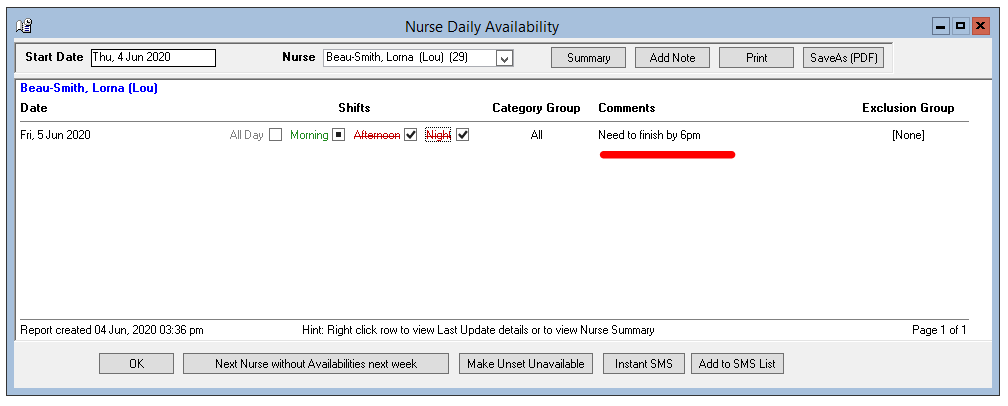
Availability Comments Present in Warnings at point of rating
Any comments against daily availabilities will now show in the warnings screen for the relevant day when rating rosters:
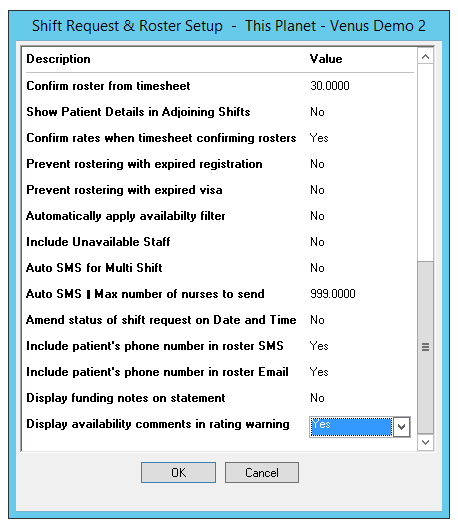
First you will need to enable this in Shift Request & Roster Setup under Data Entry:
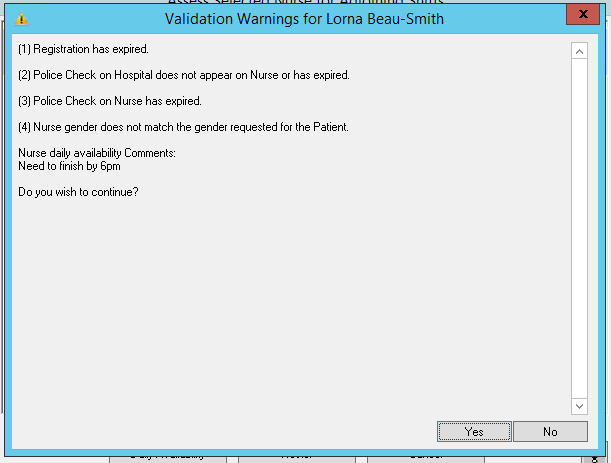
And then any comments will appear at the warning screen:
Best Practice Assistance
Through changing requirements, we have had to make the decision to modernise some aspects of the typically flexible platform to ensure more accurate procedure and process is followed. With the increase in reporting, accountability and legislated adaptations, we have needed to remove some flexibility from the platform and code to more accurate process, particularly in the items listed below.
I have been in discussions with clients impacted directly to assist in correct procedure, and how to use Venus in the most correct manner. The project for improving "Best Practice" and accurate procedural solutions is ongoing. You will see through the next year, and following years an increase in warnings and tips in system to assist you with following the correct procedure, and slowly some work arounds will be coded out with appropriate correct functions in their place. All correct procedures will be uploaded into this knowledgebase for reference. Examples being:
- Negative Allowances being phased out
- Deleting of Audit trail via deletion of payslips instead of appropriate adjustments being used.
- Distribution of credit notes instead of deletion and regeneration of invoices.
- Spoofing of email addresses being phased out due to global adoption of DMARC policies
Calendar interface – Monthly
We have built the foundations for an interactive dashboard to improve user friendliness and ease of navigation for your staff. We have now completed that infrastructure and are able to release the first module in that project, The Month View navigation. This is a core development and is available to all clients free of charge.
This view allows your staff to easily navigate to specific "work sheets" through a visual interface that will auto apply relevant filters, relating to that specific day, client or staff member. This reduces navigation of menus and sub menus, saving time and increasing the applications useability without reducing functionality.
The link below walks through the current function of the calendar interface:
Video Showcase for Calendar View
Below are developments that are currently being worked on:
- Week View - Providing greater granularity relating to clients, Categories, Staff Types and other groupings that would otherwise not fit on a month view
- Daily View - Again drilling down further to deliver better navigation of finer detail relating to a specific day only
- To-Do List - A great function for new internal employees and clients that have physically distant staffing, where we leverage the task management and visual navigation functionality in Venus to create specific workflows created by you, the user, that chain commonly grouped processes into automated notifications that let the responsible person know when they can start a task. A prime example being payroll and invoicing, you can create the list of dependencies, detail the responsible persons, or group of persons for each task, when the timesheets have been checked, the payroll person is notified that they can run Payroll and submit the ABA file, then the next person is notified that the STP report is ready for submission etc. Each to-do notification will include a direct link to the screen where the staff member can complete that task, removing the need to navigate and filter to the relevant worksheet.
Geo Location Services
To develop greater time-sheeting functionality has been the area where This Planet has seen the greatest interest from our client base. As such we have focused a lot of our efforts into improving the Quicksign Functionality to incorporate industry standard functions such as the ability to check in and check out of rosters, locating the staff member at those points in time, and enabling auditing of the tolerances set/met/missed.
In addition to this increased functionality, we have introduced an audit screen where a user can manage the new integrations from, and from where they can run through the rosters of variable status' and exceptions to clarify with the relevant worker any variances away from your pre-set tolerances.
Video Tutorial for Check-In and Check Out
Signed Timesheets
Reports can now be emailed direct to staff and clients with the relevant signatories on the staff members timesheet, or the clients daily rosters. The above video tutorial will cover this also.