Nurse > Nurse > Linked Documents
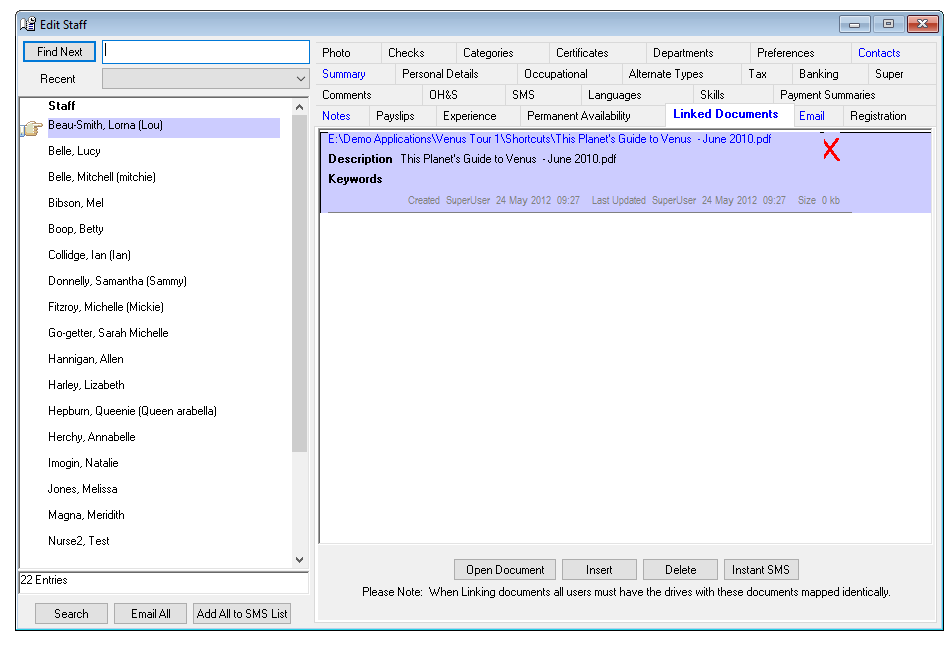
Linked Documents tab allows you to link a document (references, contracts etc.) to a Nurse. A summary of the linked documents is displayed. Documents can be opened with a mouse click.
Linking a Document
To link a document to a Nurse -
- Select Insert on the Linked Document tab.
- Locate the appropriate Directory and File.
- Select the document to link.
- Open – to create the link.
- Cancel – to exit.
A reference to the document now appears on the Linked Documents tab with the following information –
- Name of file path.
- Description or name of Document.
- Keywords – free text area where you can insert a description of the document.
- The note in grey text records the creation of document and file size.
Opening and editing a Linked Document
To open or edit a Linked Document –
- Highlight the document to be opened.
- Select Open Document on the Linked Document tab.
- Review or edit the document as required.
- Close the document window when finished. If any changes are made, Venus will ask if you want to save the changes.
- Venus will return you to the Linked Documents Tab.
Deleting a Linked Document
To delete a Linked Document -
- Highlight the document to be deleted.
- Select Delete.
Original Document Moved
If the document linked in Venus has been moved from the original directory and file or not currently accessible via the network, a red X appears indicating the link is no longer valid.