Nurse > Nurse > Banking
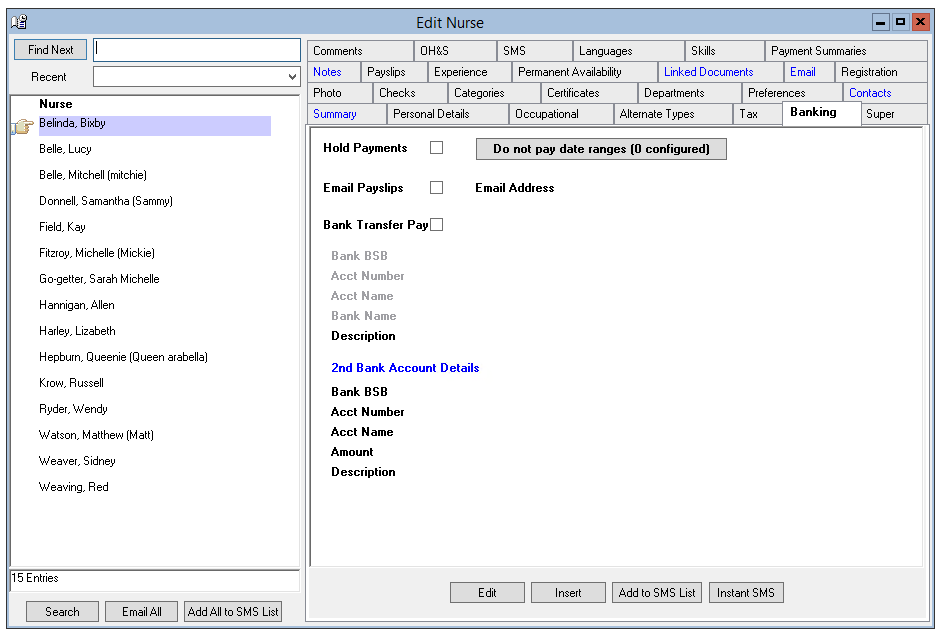
The Banking Information tab records the banking information for a nurse is partly populated when you add a new Nurse on the Edit Nurse screen.
However, there are additional fields on the Banking tab not included in the Edit Nurse screen:
- Hold Payslips – When Hold Payslips is ticked, The Nurse will be removed from payroll until the tick is removed. This can be used for new Nurse who has not yet supplied banking, tax and or super information.
- Do Not Pay Date Range – When selected add the start and end date. Multiple date ranges can be added. The Nurse will not be paid for this period, but the Hospital will be invoiced. This can be used when the Nurse is being paid by another entity or division within your business.
- Description – A description of the main Bank Account.
Editing Banking Information
To edit Banking Information, complete the following steps -
- Select the Edit option to open the Edit Nurse screen.
- Update information as required. Overtype the record as required.
- OK – to save and verify.
- Verify the information updated and OK to save.
Adding a 2nd Bank Account
A 2nd bank account can be added for a Nurse on the Banking tab. The amount of money to be deposited into the second bank account is deducted from the net pay, with the balance being deposited into the first bank account.
The Bank Transfer File Report will detail both deposits.
The 2nd Bank Account details are recorded directly onto the Banking tab.