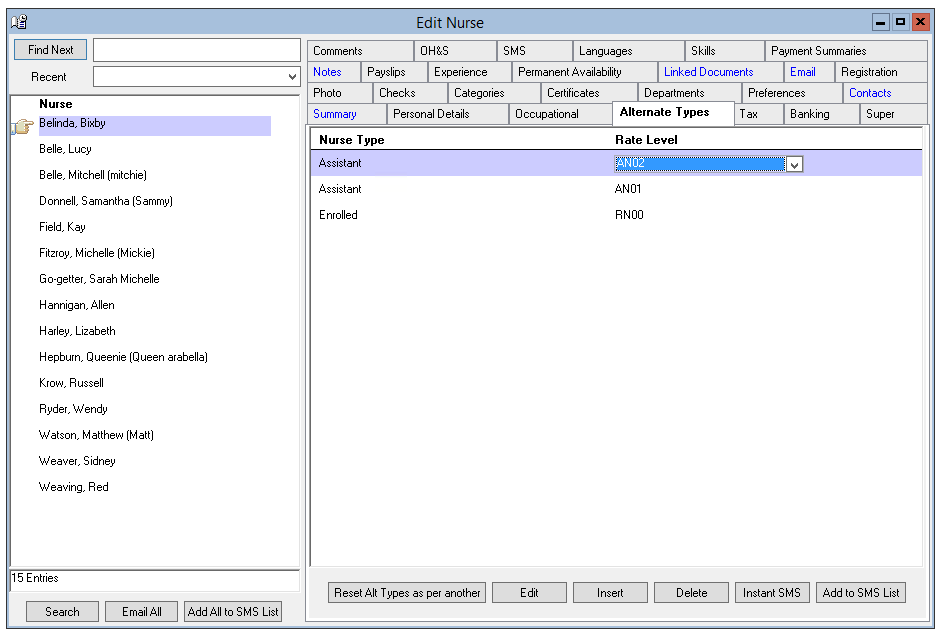
Nurse > Nurse > Alternate Types
The Alternate Types Tab records all of the possible roles that the Nurse could be rostered into e.g. The Primary Nurse Type may be Registered Nurse however, the Nurse may also be qualified to be rostered as a Midwife, an ICU Nurse and a range of other specialities.
The Alternate (Nurse) type serves several important functions, including -
- More accurately match a Nurse’s skills with Hospital’s Nurse requirements
- Ensure your Nurses are being considered for all possible shifts that meet their multi-skill base.
- Ensure your Nurses are being paid appropriately if they fall within a range of levels across a range of awards.
A Nurse’s primary occupation should be recorded on the Occupational tab and all other nurse occupation types and classifications should be recorded under the alternate nurse types.
The Nurse primary and alternate types are used when Venus is searching for the best available Nurse for a shift.
Adding Alternate Types
To add alternate type for a Nurse -
- Select Insert on the Alternate Nurse tab.
- Nurse Type – Select from the drop-down menu.
- Nurse Level – Select from the drop-down menu.
- The information is saved when you leave the tab.
Editing Alternate Types
To edit an alternate nurse type -
- Highlight the alternate nurse type to be edited.
- Update the information as required.
- The change will be saved when you leave the tab.
Deleting Alternate Types
To delete an alternate nurse type -
- Highlight the nurse type and level to be deleted.
- Select Delete.
Reset Alternate Types as per Another
The Reset Alternate Types as per Another button, allows you to make a Nurse’s alternate types the same as another Nurse.
To make a Nurse’s alternate types the same as another; select the Reset Alternate Types as per Another button and then select the other Nurse.