Leave Management Module
The Leave Management Module for Venus is a Value-Add module. With this module you can track leave accrual and make leave payments to your nurses.
Leave Setup
Data Entry > Leave Setup
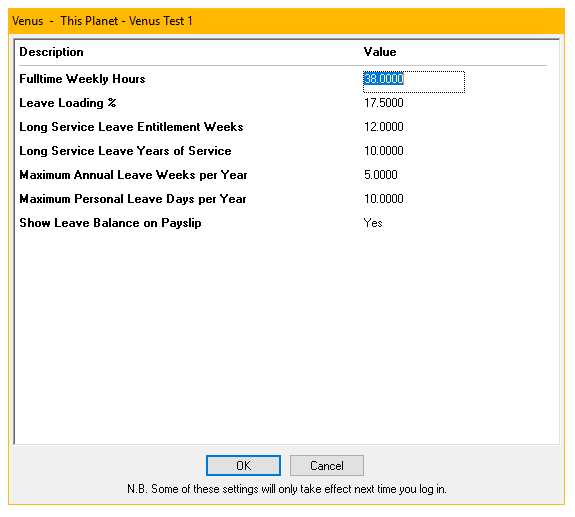
This is where you set the default values that will be used to calculate leave accrual and payment for all nurses unless the values are overridden on a per nurse basis.
- Full Time Weekly Hours – The number of hours that constitutes a full time working week.
- Leave Loading % - The percentage of an annual leave payment that will be added as loading.
- Long Service Leave Entitlement Weeks – The number of weeks of long service leave that nurses will have accrued at the point when they are eligible to take long service leave.
- Long Service Leave Years of Service – The number of years that nurses must work before being eligible to take long service leave. The Entitlement Weeks value above will be accrued over this period.
- Maximum Annual Leave Weeks Per Year – The maximum number of weeks of annual leave that a nurse will accrue in a year, if working full time.
- Maximum Personal Leave Days per Year - The maximum number of days of personal leave that a nurse will accrue in a year, if working full time.
- Show leave balance on payslip – Yes: Leave balances will be displayed on the payslips of any nurses who are accruing leave. No: The leave balances will not be displayed on the nurses’ payslips.
Maximum leave accrued on Shift Types
Data Entry > Types > Shift Types Tab > Max Leave Accrual Hours
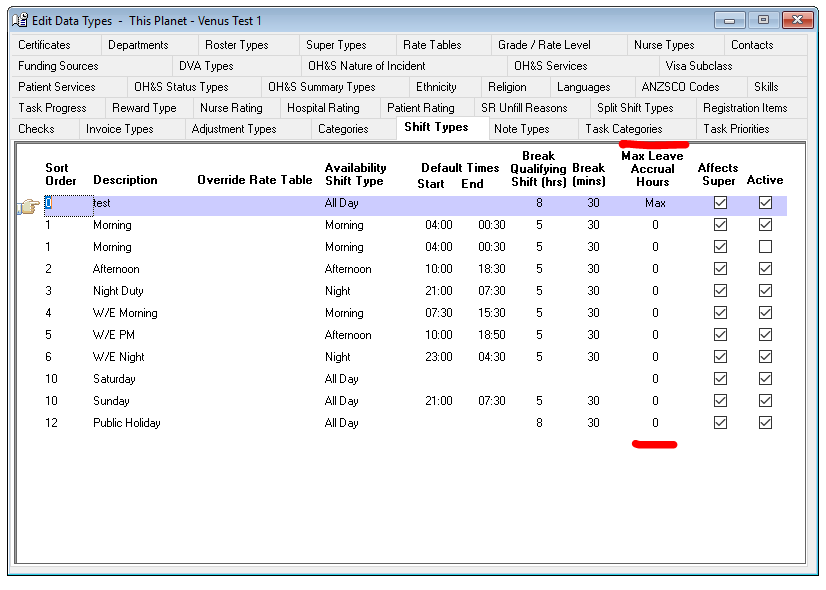
Use this field on the Shift Types data entry tab to limit the number of hours that leave will be accrued on.
- To accrue leave on all hours of this shift type, select Max
- To accrue no leave on this shift type, enter the number 0
- To only accrue leave on a portion of a longer shift, type the number of hours for which leave will be accrued. Shifts shorter than this maximum will accrue leave for the duration of the shift only.
Setting Up Leave Values for an Individual Nurse
Nurse > Nurse Leave
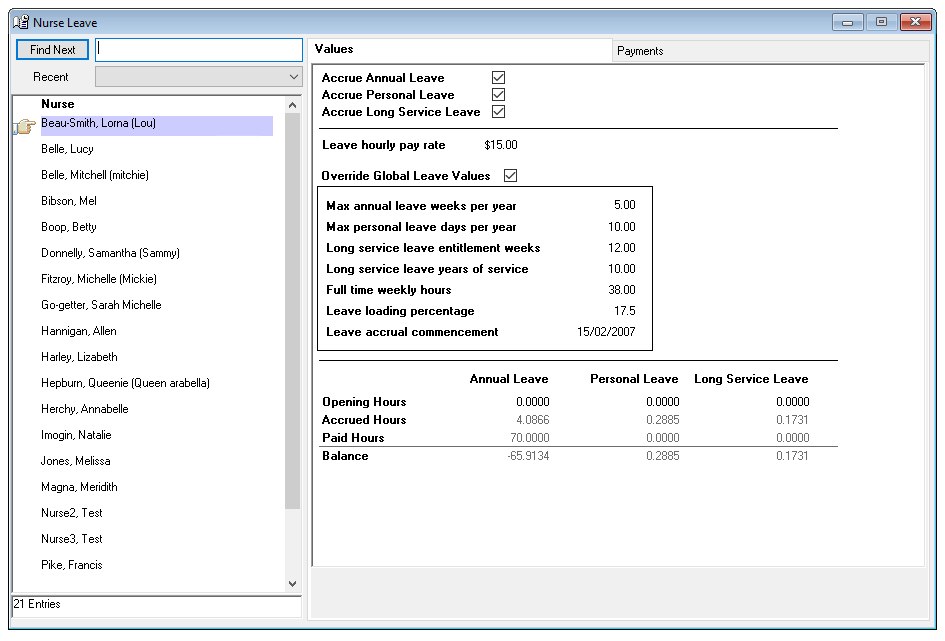
Nurse > Nurse Leave > Values Tab
On this Tab you can:
- Choose which types of leave a nurse will accrue
- Set leave values for a nurse that will override the default values
- Set opening balance for the nurse’s leave
- View the current leave balances for the nurse
This tab has the following settings
- Accrue Annual/Personal/Long Service Leave – Check the boxes for any types of leave that this nurse will accrue. Other settings on this tab cannot be changed unless the nurse is accruing at least one type of leave.
- Leave Hourly Pay Rate – The default hourly pay rate for leave payments made to this nurse
- Override Global Leave Values – Check this box to if you wish to override the default values for this nurse
- Max annual leave weeks per year – The maximum number of weeks of annual leave that this nurse will accrue in a year if working full time. Even if the nurse is not working full time, this value should be set to the maximum number of weeks for a full-time position.
- Max personal leave days per year – The maximum number of days of personal leave that this nurse will accrue in a year if working full time. Even if the nurse is not working full time, this value should be set to the maximum number of days for a full-time position.
- Long Service Leave entitlement weeks – The number of weeks of long service leave that this nurse will have accrued at the point when they are eligible to take long service leave.
- Long service leave years of service – The number of years that the nurse must work before being eligible to take long service leave. The Entitlement Weeks value above will be accrued over this period.
- Full time weekly hours – The number of hours that constitutes a full time working week.
- Leave loading percentage – The percentage of an annual leave payment that will be added as loading.
- Leave accrual commencement – The date from which leave will begin accruing. Note: Leave is NOT calculated retrospectively if this date is in the past. Use the Opening Hours fields to enter any leave that has been accrued prior to using the leave module in Venus.
Leave Balances
Enter a value into the Opening Hours fields for Annual, Personal and Long Service leave to include any leave that has been accrued prior to using the leave module in Venus or to make manual adjustments to a nurse’s leave balance.
The total accrued, paid and the overall balance for each type of leave is displayed below.
Making Leave Payments
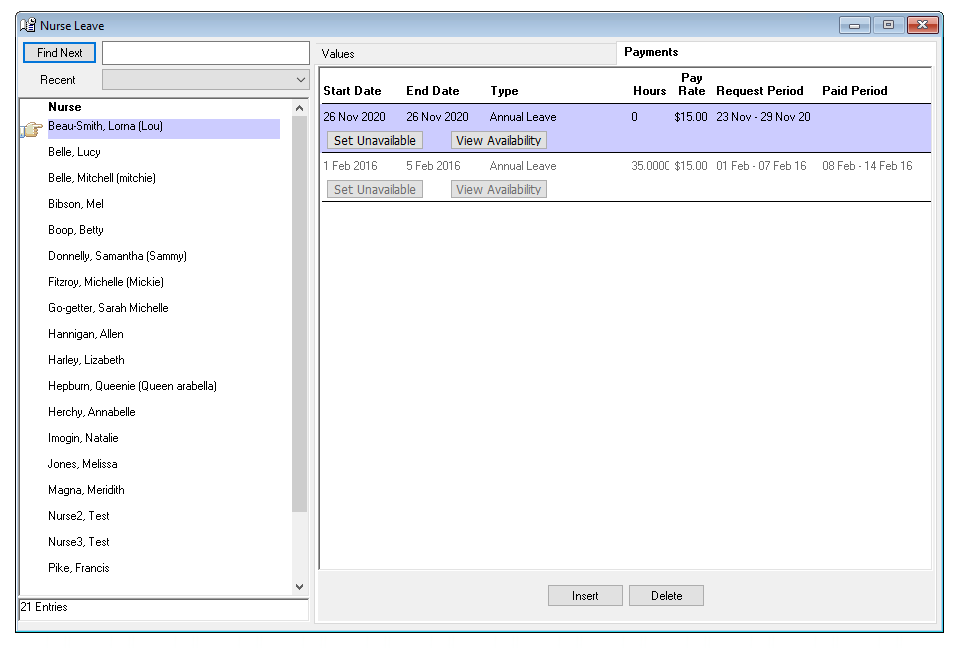
Nurse > Nurse Leave > Payments Tab
Use this tab to enter details of leave payments to be made to the nurse. Click the Insert button to insert a new leave payment and Delete to delete an unpaid leave payment. Leave payments which have been paid cannot be deleted.
Enter the following details for a new leave payment
- Start Date – The first day that the nurse is on leave
- End Date – The last day that the nurse is on leave
- Type – The type of leave to be taken. The following types are available
- Annual Leave – A loading payment will automatically be added for this type of leave. Leave is accrued on Annual Leave payments
- Annual Leave Final Payout – Use this leave type to make a final payout of any owing annual leave to a nurse whose employment has ended. A loading payment will automatically be added for this type of leave. Leave is not accrued on this type of leave payment.
- Personal Leave Without MC – Use this leave type for leave personal leave payments where a medical certificate has not been provided. Leave is accrued on Personal Leave payments.
- Personal Leave with MC – Use this leave type for personal leave payments where a medical certificate has been provided. This leave type functions the same as Personal Leave Without MC.
- Long Service Leave – Leave is accrued on Long Service Leave payments
- Leave Without Pay – Use this leave type to record leave that is to be taken without a payment being made. This leave type does not affect the nurses pay or leave balance. This leave type is used only for record keeping purposes.
- Paid Parental Leave - Non-Accrual leave that does not deduct leave balances
- Cashed Out Leave - A Payment of accrued leave, deducts leave balances when used.
- Workers Compensation Leave - To be used when a staff member is on workers compensation leave, NOT to be used for Return to work payments, please see the resource on Adjustments for return to work payments.
- Hours – The number of hours of leave to be paid to the nurse. This value will be subtracted from the relevant leave upon payroll generation.
- Pay Rate – The hourly rate at which the leave payment will be paid.
- Request Period – The account period during which this leave payment will be processed.
- Paid Period (read only) – Displays the account period in which this leave payment was processed.
Set Unavailable – Use this button on leave payments to insert ‘Unavailable’ records into the nurse’s daily availability for the duration of the leave. Note: This will delete any existing availability records in this period.
View Availability – Use this button to view and adjust the nurse’s daily availability in the case where adjustments have been made to the start or end date.
Leave Reports
Reports > Financial Reports > Leave Reports
There are two reports to assist with managing leave entitlements:
Leave Audit Report
The Leave Audit Report details the various leave entitlements of each Nurse and how they are accrued.
This report also details for each paid account period leave accrued and paid.
Leave Balance Report
The Leave Balance Report provides a summary of all current leave entitlements for all staff, including inactive.