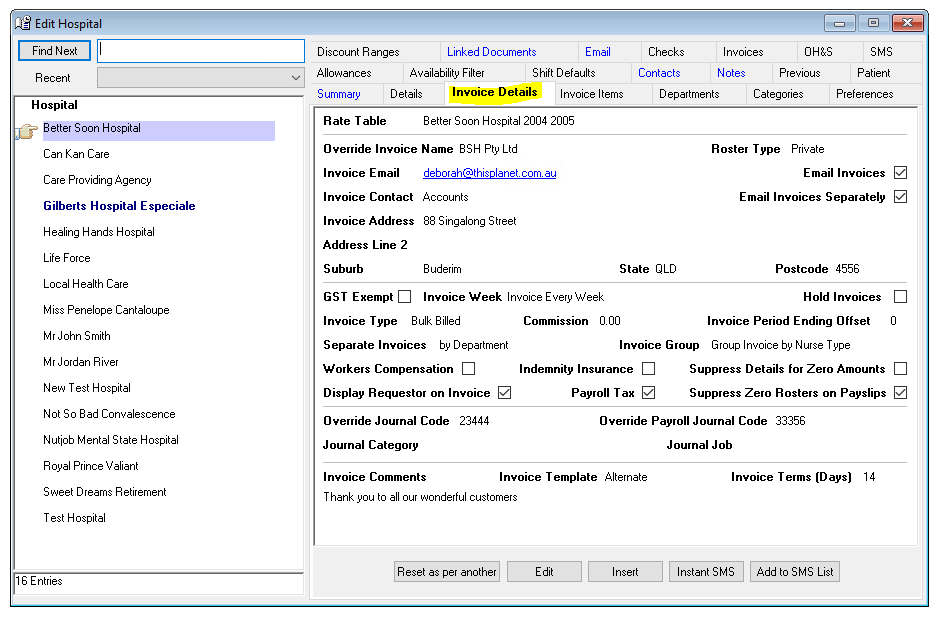
There are different invoice calculations and layouts available based on the invoice type selected for each Hospital on the Hospital Details tab.
Bulk Billed (BB)
A bulk billed invoice details a range of selected on-costs with service charges based on an hourly charge rate, or a commission based on either a nurse pay rate or a charge rate.
The on-costs can be one, all or some of the following –
- Superannuation
- Workers Compensation
- Payroll Tax
- Professional Indemnity
Tip:
Hospitals who receive Bulk Billed invoices have (BB) next to their names on the Multishift Request and Single Shift Rating screens. How the charge rate is calculated and the on-costs included in the bulk billed invoice depend on how you set-up each Hospital. If a Hospital is to receive a bulked billed invoice ensure the Invoice Type selected is Bulk Billed. Ensure you select the correct Rate Table. Remember the commission calculations will be based on the charge rate entered for the selected rate table. If the agreed rate is a commission based on the nurse pay rate you must ensure the charge rate equals the Nurse rate on the rate table selected for the Hospital. To include an on-cost in your invoice ensure the on-cost boxes are ticked. The rates used are detailed under the Accounting Values Tab.
Bulked Bill Invoice – including a commission
To set-up a Hospital on a bulked billed invoice including a commission ensure the commission percentage is recorded in the commission field on the Hospital Details tab.
When creating and selecting the rate table you can have –
- The same rate for both nurse and charge rates, so that the commission is based on the nurse rate or
- Different rates for nurse and charge rates, so that the commission is based on the charge rate rather than what is paid to the nurse.
You determine if workers compensation, payroll tax and or indemnity insurance are included or not on the invoice. The percentages applicable to these on-costs are recorded in the Accounting Values screen. The on-cost calculations for this type of invoice are based on a combination of the nurse pay rate and the charge rate, and not just on the sub-total of the invoice.
Superannuation – Based on the nurse pay rates and allowances that are flagged as included in the super gross calculations
Professional Indemnity – Based on the sub-total of the invoice.
Workers Compensation – Based on the nurse pay rates, allowances and superannuation.
Payroll Tax – Based on the nurse pay rates, allowances and superannuation.
Agency Fee
The Agency Fee invoice is based on a set fee paid to the Agency for each rostered shift. The fee may change based on the type of Nurse and type of shift filled. Ensure you select the correct rate table and the rate type is agency fee basis and not hourly rate. The Hospital pays the nurse. Venus will generate a payslip for the Nurse providing and confirming the shift details but the amount paid will be zero.
Tip:
Agency Fee Hospitals have an (AF) next to their names.
Percentage
A percentage invoice is based on a percentage of the nurse rate, or an agreed charge rate, where the on-costs are built into the additional percentage. Ensure the correct rate table selected. Where the agreed percentage is based on the nurse charge rate, the nurse pay and the charge rate must be identical as the invoice calculation is based on the charge rate. Record the agreed percentage in the Commission field on Hospital Details tab. The Hospital pays the nurse. Venus will generate a payslip for the Nurse that details the shift but the amount paid will be zero.
Tip:
Percentage invoiced Hospitals have (PC) next to their name.
Private
When an invoice is based on a charge rate that includes the nurse pay rate and all on-costs and margins, the private invoice should be used. Ensure the correct rate table is selected for the Hospital; the charge rate must be higher than the nurse pay rate.
Tip:
Hospitals who receive private invoices have (PV) next to their name.
Credit Notes
If you need to generate a negative invoice, Venus will automatically change the Invoice label to “Credit Note”.
Data Entry > Types > Invoice Types

The Invoice Types tab is a read-only tab. The Invoice Types are the methods used to calculate invoices and are allocated to Hospital on the Hospital Details Information tab.
There are four Invoice Types -
- Agency Fee Only (a flat fee per shift).
- Bulk Billed (commission based on a percentage of the nurses’ wages for shifts worked plus all or some of the following on-costs Workers Compensation, Public Liability, Payroll Tax and Superannuation).
- Percentage (an agreed percentage of nurses’ wages for shifts worked).
- Private (an hourly rate that includes all on-costs and margins)