Data Entry > Types > Languages
The Languages tab records information that can be allocated to your Patients and Nurses.
Adding a Language
To add a Language –
- Select Insert on the toolbar.
- Sort Order – The order the Language will appear in the drop-down menus.
- Language – The name of Language.
- The information is saved when you leave the tab.
Editing a Language
To edit a Language -
- Highlight the Language to be edited.
- Overtype as required.
- The information is saved when you leave the tab.
Deleting a Language
You cannot delete a Language.
Patient > Languages
The Languages tab records other languages spoken by the Patient.
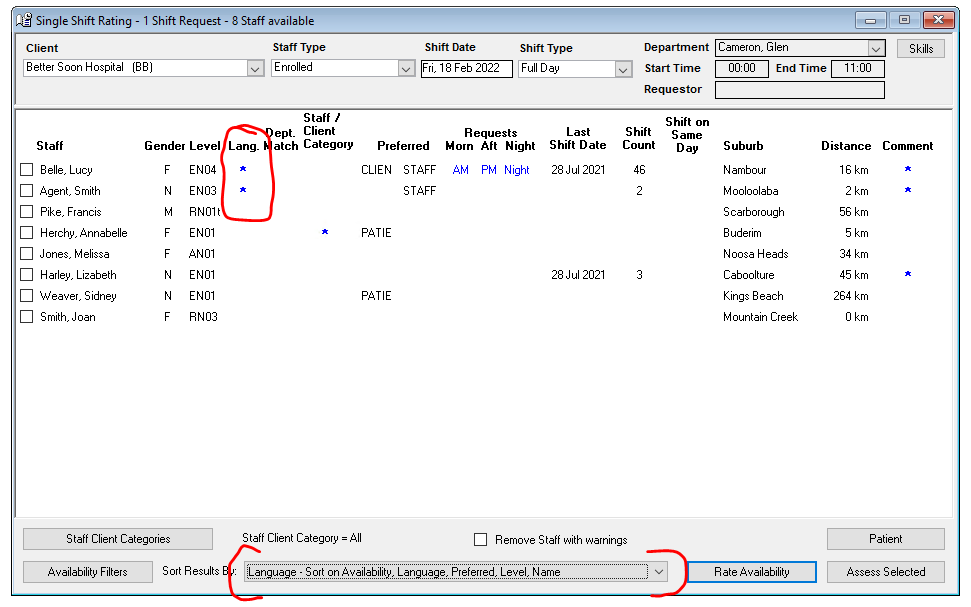
Languages are used in Single and Multiple-Shift Rating. A flag on these screens indicates when there is a match between a Nurse/Carer’s Language skills and a Patient’s Language requirement.
To indicate that a Patient speaks another language, tick the appropriate box.
Languages are set up at Data Entry > Types > Languages.
Nurse > Nurse > Languages
The Languages tab records other languages spoken by the Nurse.
Languages are used in Single and Multiple-Shift Rating. A flag on these screens indicates when there is a match between a Nurse/Carer’s Language skills and a Patient’s Language requirement.
To indicate that a Nurse speaks another language, tick the appropriate box.
Languages are set up at Data Entry > Types > Languages.
Matched Language Criterion: