Data Entry > Types > Nurse Types
The Nurse Types tab records the types of nurses or personnel engaged by your Agency.
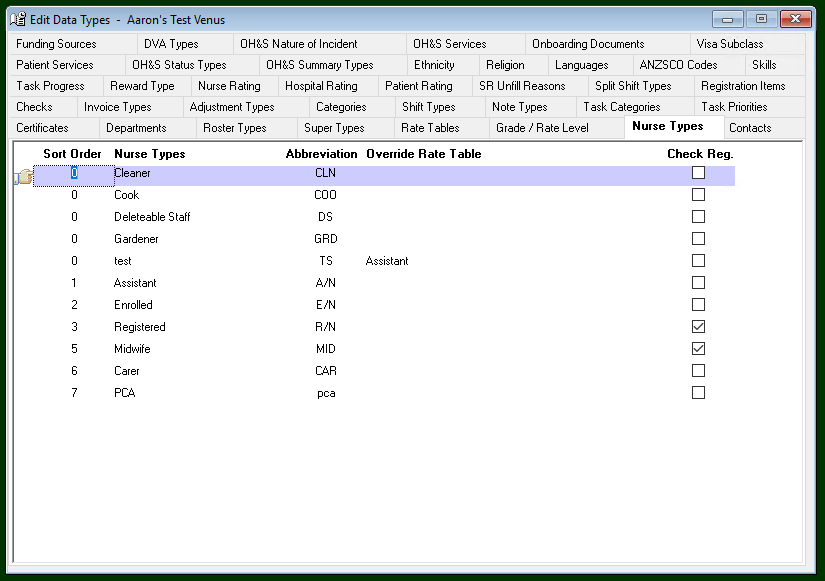
Adding a Nurse Type
To add Nurse Type -
- Select Insert on the toolbar.
- Sort Order – The order the Nurse Type will appear in the drop-down menus.
- Nurse Types – The type of Nurse e.g. Registered, Enrolled etc.
- Abbreviation – Abbreviation of Nurse type e.g. R/N, E/N etc.
- Override Rate Table – This section only applies if you have different nurse types who have the same pay and charge rates. Rather than creating and maintaining two sets of rate table entries, the override function links the selected nurse type to another nurse type’s rate table entries.
- Check Registration – Tick this box for nurse types that must have current registration at all times. Check Registration will check the expiry date of the registration against the roster date and issue a warning if rostering a nurse with an expired registration.
- The information is saved when you leave the tab.
Editing a Nurse Type
To edit a Nurse Type –
- Highlight the Nurse Type to be edited.
- Overtype as required.
- The information is saved when you leave the tab.
Deleting a Nurse Type
You cannot delete a Nurse Type.