Under Accounts add a new section called Generate Aged Care Funding.
When selected, a start and end Account period (may be the same if only one accounting period is to be selected) must be entered. A single or all patients may be selected. A funds date may be entered (default is today). This funds date will appear in the funding tab as well as statements and budgets. This is also the date that will determine the statement period.
Note: Funds Auto generated will appear on statements according to the actual date that they represent and not the Funds date.

Only the following patients will be selected:
- Patient is active
- Patient is an Aged Care patient
- Patient has Auto generation of Funding set to Y
- Patient has not had funding added for any of the accounting periods previously. If a patient has had funds auto generated the system will display a warning. Funds cannot be duplicated.
- As a patient may have more than one funding program, the program that receives the funding must be selected (only one can be selected to receive funds). The Auto Generate Funds (see below) must be set to yes. Funds default to no so one must be set on. If another is set to yes, an error will be presented.

New funding record/s is to be generated with the following criteria and calculations:
- Funding Source from patient record (Auto Generation Funding Source)
- Funding records are created as follows:
- The number of days for the selected period is calculated
- Number of days from start to end of selected account periods
- This is compared to the start and end date of the plan and if either the start or end dates occur within the selected account period the number of days is varied accordingly. Note; You cannot generate funds for dates outside the start and end date of a patient funding plan.
- The funding suspended dates are checked and if and days are suspended within the selected account periods these are removed from the total days for the plan.
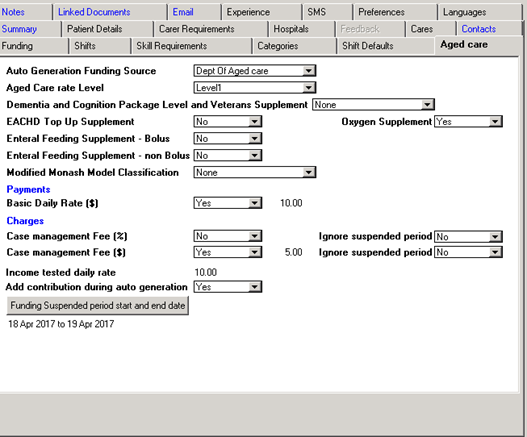
- The Aged care rate is looked up based on the Aged Care level rate recorded on the patient record.
- If the Income tested rate for the patient is greater than zero then the Aged Care level rate is adjusted by this amount and a funding record is created by multiplying the adjusted amount multiplied by the number of days calculated above. The funding item is identified as “Funding instalment – Aged care Sub. dd/mm/yyyy – dd/mm/yyyy”. You can also set the Income Tested daily fee so that it does not automatically generate in the auto generating function.
- If the Aged Care “Deduct income tested fee during auto generation” is set to yes than another record is generated which takes the Income tested daily rate multiplied by the days calculated above. This line item is identified as “Funding Instalment – Income tested Fee dd/mm/yyyy- dd/mm/yyyy”. If the amount is set to No then the system assumes that the agency will manually add this amount when they have received the funds form the patient.
- If any of the Supplementary rates (EACHD, Oxygen, etc.) are set to yes (or a level selected) then the rates are taken from the parameter table loaded in the Data Entry section and accumulated and multiplied by the number of days calculated above and a funding record is created. The funding item is identified as “Funding instalment – Aged care Sup. dd/mm/yyyy – dd/mm/yyyy”
- If the basic Daily rate ($) is set to yes and the amount is > zero (default is the company global amount set in the data entry section but can be overridden at patient level) then the amount here is multiplied by the days calculated above and a funding record is generated and is identified as “Funding Instalment – Daily Fee dd/yy/mmmm – dd/yy/mmmm.
- If the Case management Fee ($) is set to yes and the amount is > zero (default is the company global amount set in the data entry section but can be overridden at patient level) then the amount here is multiplied by the days calculated above and an expense record is generated and is identified as “Funding Expense – Case Management Fee dd/yy/mmmm – dd/yy/mmmm.
- If the Case management Fee (%) is set to yes and the percentage is > zero (default is the company global amount set in the data entry section but can be overridden at patient level) then the indicated percentage of the total funds generated above (including the income tested fee regardless of the indictor setting) is calculated and an expense record is generated and is identified as “Funding Expense – Case Management % Fee dd/yy/mmmm – dd/yy/mmmm.
- The system can be set to ignore suspended case management fees (both $ and %) if requires. This will mean that the Case management fee will be generated regardless of a suspended period been applicable.
- The number of days for the selected period is calculated